
How It Works
Create your route in three simple steps
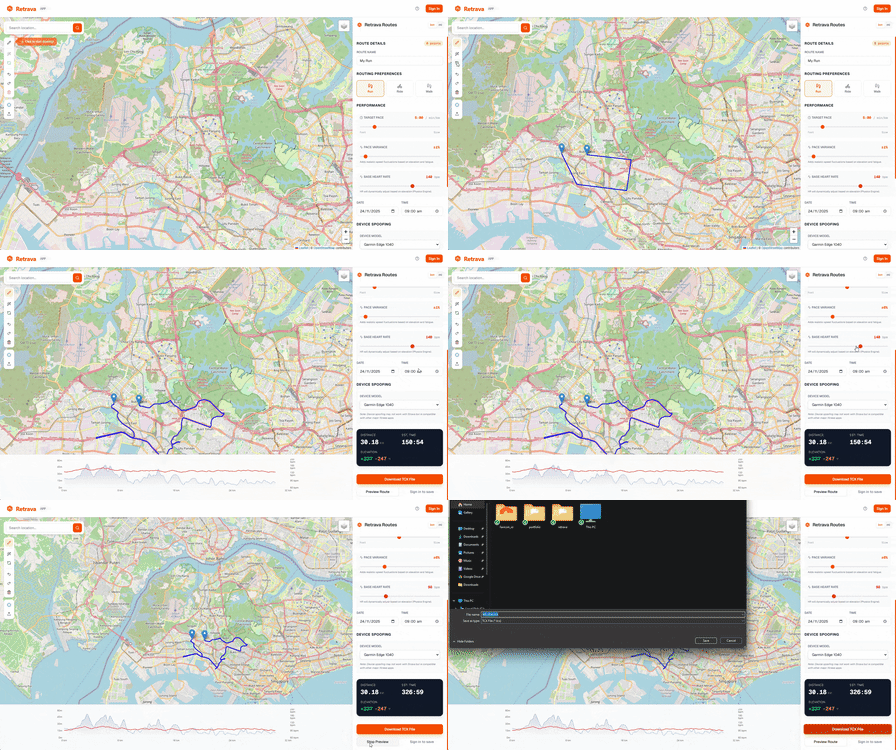
1. Draw Your Route
Click on the map to create waypoints. Use snap-to-roads for automatic path following, or draw freehand for off-road routes.
2. Customize Details
Set your pace, start time, and date. Add realistic heart rate data and choose your device. Fine-tune every aspect of your activity.
3. Export & Upload
Download your TCX file and upload it to Strava, Garmin Connect, or any other fitness platform. Your activity is ready to go!
See It In Action
Watch how easy it is to create your routes
Powerful Features
Everything you need to create realistic activities
Smart Route Snapping
Automatically snap to roads or draw custom off-road paths anywhere in the world
Realistic Heart Rate
Physics-based HR simulation that reacts to elevation changes with customizable variance
Pace Control
Set exact pace with variance slider for realistic speed fluctuations throughout your route
Device Spoofing
Choose from popular devices or create custom ones. Works with most fitness platforms
Universal Compatibility
TCX export works with Strava, Garmin, TrainingPeaks, and all major fitness platforms
Save & Load Routes
Registered users can save routes and reload them later for quick exports
Common Questions
Everything you need to know about Retrava